
May 2025
Telecom Capacity Forecasting with Machine Learning: How We Predicted Cell-Tower System Module Demand
We built an on-prem, hourly ML pipeline that flags capacity risks on cell-tower system modules and forecasts when each module will hit high utilization thresholds. The data is ingested from OSS, it is transformed to generate telecom-specific features, trains machine learning models, and exposes results in an internal dashboard for network engineer planners.
The challenge
There are many definitions of capacity on radio networks, but for this project we focused on system module capacity. Each cellular network antenna (Base Transceiver Station) has a system module, the equivalent of a CPU in a computer. When the system module capacity hits its limit, performance degrades, directly affecting users.
Operations only had point-in-time snapshots from the OSS, which left planners without forward visibility. They couldn't answer: Which system modules will cross safe thresholds, and when?
Our goals in one line: Predict when a system module will breach a utilization threshold and flag modules that are at risk within 30/60 days, so planners can order, swap, or make optimizations before customers feel it.
Success criteria (business-level):
- Reduce surprise breaches during busy hours
- Increase lead time on capacity tickets
- Better targeting of upgrades (do the right sites first)
The solution
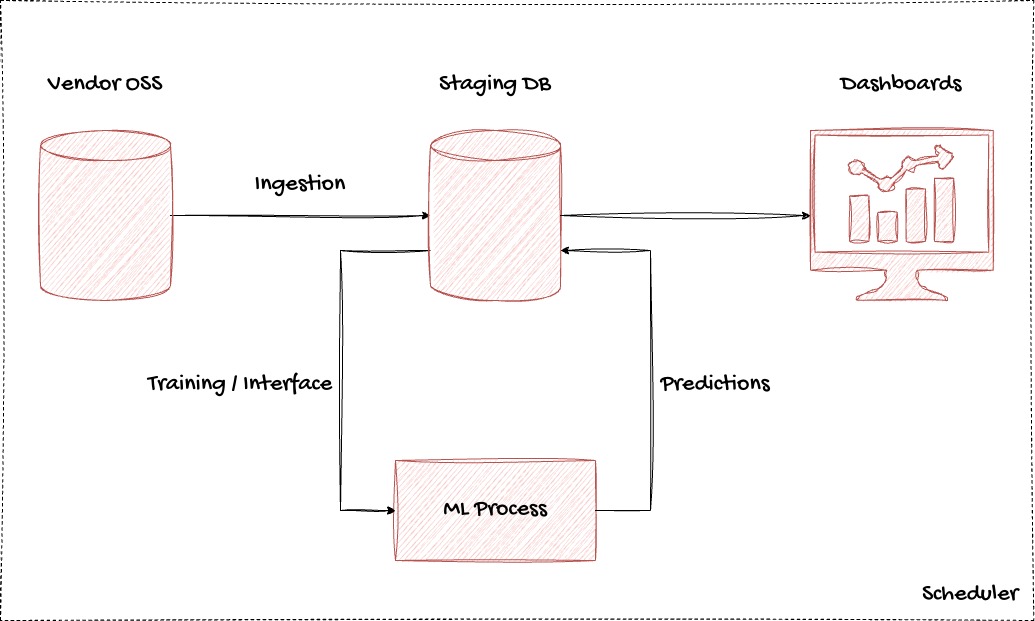
Architecture Design (on-prem, simple, reliable)
We kept it boring on purpose. Planning isn't high-frequency trading—hourly was enough and far easier to run.
High-level flow: OSS → Staging DB → Data Processing Jobs → Model Inference → Dashboard
Key choices:
- On-prem everything, due to compliance restrictions
- Columnar analytics DB for time-series (fast analytics, low storage cost)
- Batch scheduling, not streaming—hourly was simple, safe, and fit the use case
Data Ingestion from OSS
We mirrored selected OSS tables/counters to a staging schema, then normalized and deduplicated before feature generation.
Sources:
- KPIs per system module (utilization %, throughput, PRB usage, busy hour)
- Topology (module ↔ site ↔ region)
- Maintenance windows / recent changes
- BTS site configuration
Cadence:
- Hourly pulls with a 12-hour grace window to avoid flapping states
- Late-arriving records handling, unit normalization, and null imputation
Feature Engineering
We designed nearly a hundred features, grouped into:
- Load: 7-day & 30-day rolling means/medians, weekday/weekend flags, busy-hour utilization
- Seasonality: monthly index; holiday/event proximity; school calendar signals
- Topology context: neighbor utilization percentiles, region growth factor, site class (urban/suburban/rural)
- Reliability hints: recent change windows, known faults/alarms in last 14 days
- Capacity deltas: time-to-threshold under linear/exponential extrapolations
- BTS Configuration: site settings and optimizations
Modeling Approach (forecast + risk flagging)
We combined regression (to forecast utilization trajectory) with classification (to decide whether a module is "at-risk" within a horizon).
- Regressor: Gradient-boosted trees on engineered features; produced quantile forecasts (P50, P90) for safety margins.
- Classifier: "Will this module exceed threshold T in H days?" with class weights to handle imbalance.
Most important features identified:
- Busy-hour utilization (current & lagged)
- Short-term and medium-term slopes (7-day, 30-day)
- Neighbor saturation (e.g., 75th–90th percentile of neighboring modules)
- Region growth factor
- Site class (urban/suburban/rural)
- Recent change windows
- Event proximity
How We Define "At-Risk" and Prioritize Actions
After trials with stakeholders we set clear rules:
- Thresholds: per module family (≥85% sustained utilization during busy hour)
- Horizons: 30-day (urgent), 60-day (plan), 90-day (watch)
- Risk score: blend of P90 crossing time, slope steepness, neighbor saturation, site class
- Prioritization: earliest P90 breach → customer-impact proxies (population density, traffic class) → lead time
Scheduling & Ops
Because this isn't an alarm pipeline—planners act on tickets—we designed for stability:
- Hourly batches with concurrency caps so other systems aren't starved
- Idempotent runs with reproducible predictions
- Tag limits (e.g., oss-pull:2) so extraction never hammers the source
The Internal Dashboard
Built hand-in-hand with Planning Engineers, the dashboard was designed to answer one question: Where are my next problems and what actions should I take?
Key Views:
- Region → Site → Module drilldowns with threshold lines and P50/P90 bands
- Filters: module family, horizon, risk score, maintenance windows
- Action panel: suggested "optimize," "swap," "expand," or "order" with lead-time hints
- Export: CSV for weekly capacity committees
The impact
Validation & Results
We validated by sites (not individual cells) to mimic real-world decision units. Outcomes tracked during pilot and rollout:
Network impact:
- Surprise capacity breaches ↓ 30–35% in pilot, ↓ 25–30% after rollout
- SLA-relevant KPI breaches during busy hour ↓ 18–24%
What helped most (qualitative):
- Focusing on busy-hour-only features vs. all-day aggregates
- Adding context features (neighbor saturation, region growth factor)
- Using P90 forecasts to trigger tickets (less debate; safer planning)
Why It Mattered
The project turned capacity planning from reactive firefighting into predictive, prioritized action. Planners now had 30–60 days of forward visibility, confidence in forecasts, and tools to direct upgrades where they mattered most—ensuring customers experienced reliable performance even under growing demand.